Workflow Home Page
Workflow Home Page gives operators a first-class place in Cadence Web to run day-to-day workflow actions without the CLI or raw JSON forms. Cadence Web shows a Home tab on the workflow page, runs a query named home, and renders the Markdown it returns as the landing view for that execution: current state, valid next steps, and the buttons to take them.
That matters most for non-technical operators who need to approve, remediate, or kick off work safely. Application teams do not need a separate ops service for those flows; they register a Markdown home page on the workflow itself. The page uses the same Markdown and Markdoc tags as Custom Workflow Controls. On the Home tab, the tags also know which workflow they are on, so you write less.
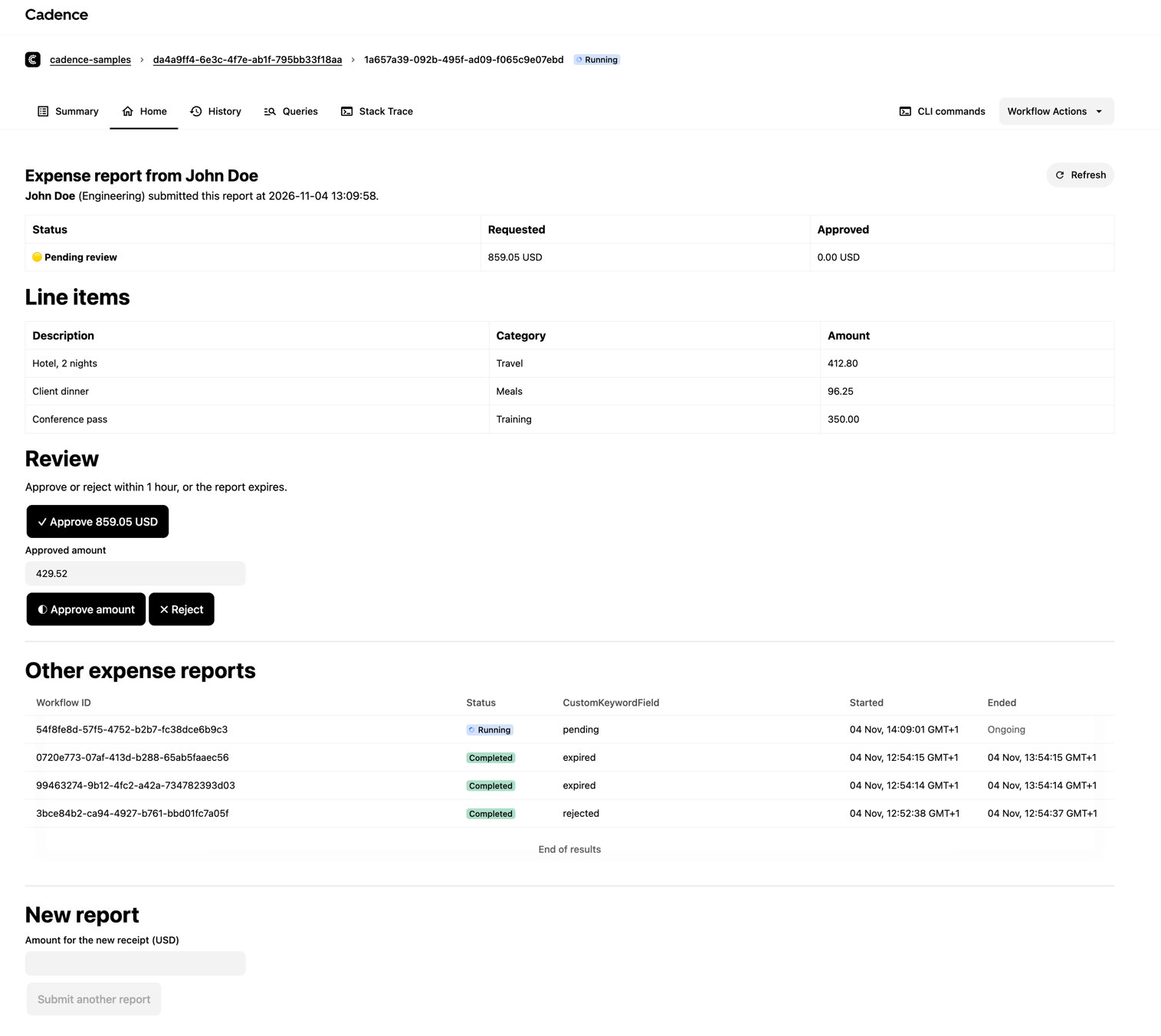
Samples
| Sample | Description | Code |
|---|---|---|
| ExpenseReportWorkflow | Approve and reject buttons, an input field for a partial amount, and a list of other reports | Go · Java |
Enable the Home tab
The Home tab needs Cadence Web 4.0.18 or later and is off by default. It is a Cadence Web feature flag, set with an environment variable on the cadence-web service. For example, in Docker Compose:
cadence-web:
  image: ubercadence/web:latest
  environment:
    - "CADENCE_GRPC_PEERS=cadence:7833"
    - "CADENCE_WORKFLOW_HOME_ENABLED=true"
Register the home query
Register a query handler named home that returns a formattedData result:
- Go
- Java
type homeResponse struct {
	CadenceResponseType string `json:"cadenceResponseType"`
	Format              string `json:"format"`
	Data                string `json:"data"`
	Title               string `json:"title,omitempty"`
}

func ExpenseReportWorkflow(ctx workflow.Context, report ExpenseReport) error {
	status := "pending"

	err := workflow.SetQueryHandler(ctx, "home", func() (homeResponse, error) {
		return homeResponse{
			CadenceResponseType: "formattedData",
			Format:              "text/markdown",
			Data:                fmt.Sprintf("**Status:** %s", status),
			Title:               "Expense report " + report.ReportID,
		}, nil
	})
	if err != nil {
		return err
	}

	// ...
}
public class MarkdownFormattedResponse {
    private final String cadenceResponseType = "formattedData";
    private final String format = "text/markdown";
    private final String data;
    private final String title;

    public MarkdownFormattedResponse(String data, String title) {
        this.data = data;
        this.title = title;
    }
    public String getCadenceResponseType() { return cadenceResponseType; }
    public String getFormat() { return format; }
    public String getData() { return data; }
    public String getTitle() { return title; }
}

public interface ExpenseReportWorkflow {
    @WorkflowMethod
    void run(ExpenseReport report);

    @QueryMethod(name = "home")
    MarkdownFormattedResponse homeQuery();
}

public class ExpenseReportWorkflowImpl implements ExpenseReportWorkflow {
    private ExpenseReport report;
    private String status = "pending";

    @Override
    public void run(ExpenseReport report) {
        this.report = report;
        // ...
    }

    @Override
    public MarkdownFormattedResponse homeQuery() {
        return new MarkdownFormattedResponse(
            "**Status:** " + status, "Expense report " + report.reportId);
    }
}
| Field | Required | Value |
|---|---|---|
cadenceResponseType | Yes | "formattedData" |
format | Yes | "text/markdown" |
data | Yes | The Markdown page |
title | No | Heading at the top of the Home tab |
Sanitize any values from workflow input or signals before you add them to the page. Cadence Web renders Markdown and Markdoc tags inside them, so a value could add its own links or buttons.
Write the page
On the Home tab, signal inherits domain, cluster, workflowId and runId from the workflow page. The start and workflows tags inherit domain and cluster. Leave them out unless you want to point at another workflow.
| Tag | What it does |
|---|---|
signal | Button that signals a workflow |
start | Button that starts a new workflow |
input-field | Text or number input whose value a button can send |
workflows | Table of workflows that match a visibility query |
image | Image with a set width or height |
Signal button
{% signal signalName="approve" label="Approve" input={"reviewer":"finance-ops"} /%}
| Attribute | Required | Description |
|---|---|---|
signalName | Yes | Signal name the workflow listens for |
label | Yes | Button text |
input | No | Signal payload: true, false, "string", or a JSON object |
workflowId | No | Inherited from the page |
runId | No | Inherited from the page, but only when workflowId is too |
domain | No | Inherited from the page |
cluster | No | Inherited from the page |
If you set workflowId without runId, the signal goes to the current run of that workflow, not to the run on the page.
Start button
{% start
  workflowType="cadence_samples.ExpenseReportWorkflow"
  label="Submit another report"
  taskList="cadence-samples-worker"
  timeoutSeconds=7200
/%}
| Attribute | Required | Description |
|---|---|---|
workflowType | Yes | Registered workflow type |
label | Yes | Button text |
taskList | Yes | Task list of the worker that runs the workflow |
input | No | Workflow input, sent as the only argument |
wfId | No | Workflow ID. Default: a random UUID |
timeoutSeconds | No | Execution timeout in seconds. Default: 60 |
sdkLanguage | No | GO (default), JAVA or PYTHON |
domain | No | Inherited from the page |
cluster | No | Inherited from the page |
Set timeoutSeconds for any workflow that runs longer than a minute. After the start succeeds, a notification links to the new workflow.
Input fields
An input-field tag defines a variable with the same name. Use $name in any signal or start attribute.
{% input-field name="amount" label="Approved amount" type="number" default=42.5 required=true /%}

{% signal signalName="approve_partial" label="Approve amount" input={"amount":$amount} /%}
| Attribute | Required | Description |
|---|---|---|
name | Yes | Variable name, used as $name. Must be unique on the page |
label | No | Text above the input |
type | No | text (default) or number |
default | No | Starting value |
required | No | Buttons that use this field stay disabled until it has a value |
placeholder | No | Hint text |
Number fields send numbers. An empty optional field leaves its key out of the payload. Use {% $amount %} in text to show the current value.
Workflows list
The workflows tag needs advanced visibility on the cluster.
{% workflows
  query="WorkflowType = 'cadence_samples.ExpenseReportWorkflow'"
  columns="WorkflowID,CloseStatus,CustomKeywordField,StartTime"
/%}
| Attribute | Required | Description |
|---|---|---|
query | Yes | Visibility query |
columns | No | Comma-separated column IDs. Default: WorkflowID,CloseStatus,RunID,WorkflowType,StartTime,CloseTime |
domain | No | Inherited from the page |
cluster | No | Inherited from the page |
Images
{% image src="https://cadenceworkflow.io/img/cadence-logo.svg" alt="Cadence logo" width="200" /%}
| Attribute | Required | Description |
|---|---|---|
src | Yes | Image URL |
alt | No | Alt text |
title | No | Text shown on hover |
width | No | CSS width. A bare number means pixels |
height | No | CSS height. A bare number means pixels |
If you set only one of width and height, the other scales to keep the aspect ratio. Plain Markdown images () also work. Raw HTML such as <img> does not render.
When the page refreshes
The Home tab runs the query when it opens. It does not poll.
- After a button action succeeds, it runs the query again at once and once more 1 second later, because the worker may not have handled the signal yet.
- The Refresh button runs the query again.
What the tab shows
| Case | Home tab |
|---|---|
The workflow has no home query handler | An empty state that links to the Markdown guide |
The result is not formattedData with text/markdown | An error that names the expected format |
| The query fails or is rejected | An error with a Retry button |
| The workflow is archived | A message that home pages are not available |