Custom Workflow Controls
Introduction
Your workflow has internal state. What if your users could see it and act on it, directly from Cadence Web, without building a separate admin panel?
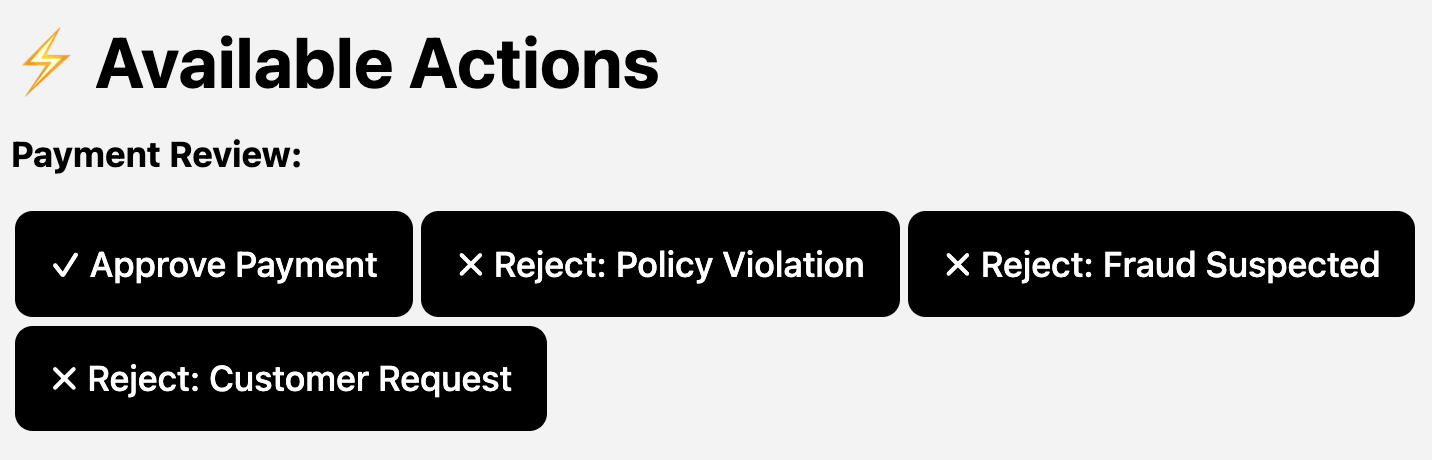
View the markdown source that produces this dashboard
### ⚡ Available Actions

**Payment Review:**

{% signal
        signalName="approve_payment"
        label="✓ Approve Payment"
        domain="cadence-samples"
        cluster="cluster0"
        workflowId="a8decc9c-8248-498d-b5f4-5dcc6f8ba620"
        runId="5942783c-beca-4305-98c3-b7bc247d053c"
        input={"operator":"ops-user"}
/%}
{% signal
        signalName="reject_payment"
        label="✗ Reject: Policy Violation"
        domain="cadence-samples"
        cluster="cluster0"
        workflowId="a8decc9c-8248-498d-b5f4-5dcc6f8ba620"
        runId="5942783c-beca-4305-98c3-b7bc247d053c"
        input={"reason":"Policy Violation","operator":"ops-user"}
/%}
{% signal
        signalName="reject_payment"
        label="✗ Reject: Fraud Suspected"
        domain="cadence-samples"
        cluster="cluster0"
        workflowId="a8decc9c-8248-498d-b5f4-5dcc6f8ba620"
        runId="5942783c-beca-4305-98c3-b7bc247d053c"
        input={"reason":"Fraud Suspected","operator":"ops-user"}
/%}
{% signal
        signalName="reject_payment"
        label="✗ Reject: Customer Request"
        domain="cadence-samples"
        cluster="cluster0"
        workflowId="a8decc9c-8248-498d-b5f4-5dcc6f8ba620"
        runId="5942783c-beca-4305-98c3-b7bc247d053c"
        input={"reason":"Customer Request","operator":"ops-user"}
/%}
Cadence Web renders markdown returned by workflow queries. Add three Markdoc tags ({% signal %}, {% start %}, {% image %}) and your query response becomes a live ops dashboard. Below, we'll build one from scratch in three steps. See the full Tag Reference for all attributes.
Samples
Full working examples in both Go and Java:
| Sample | Description | Code |
|---|---|---|
| MarkdownQueryWorkflow | Signals, start buttons, images | Go · Java |
| LunchVoteWorkflow | Interactive voting with live results | Go · Java |
| OrderFulfillmentWorkflow | Full ops dashboard with state machine | Go · Java |
How It Works
- The user runs a query from the Cadence Web Queries tab
- Your workflow returns markdown with MarkDoc tags in a special JSON shape
- Cadence Web renders it: tables, text, images, and action buttons
- The user clicks a button → Cadence Web sends a signal or starts a new workflow
- The workflow state updates → next query shows the new state
Response Format
Your query handler returns an object with this shape:
{
  "cadenceResponseType": "formattedData",
  "format": "text/markdown",
  "data": "## Your markdown here\n\n{% signal signalName=\"approve\" ... /%}"
}
| Field | Value |
|---|---|
cadenceResponseType | Must be "formattedData" |
format | Must be "text/markdown" |
data | Your markdown string (supports MarkDoc tags) |
Level 1: Return Markdown
The simplest case: return a markdown string from your query handler. Cadence Web renders it as formatted text instead of raw JSON.
- Go
- Java
type markdownFormattedResponse struct {
	CadenceResponseType string `json:"cadenceResponseType"`
	Format              string `json:"format"`
	Data                string `json:"data"`
}

workflow.SetQueryHandler(ctx, "status", func() (markdownFormattedResponse, error) {
	md := fmt.Sprintf("## Order Status\n\n**Customer:** %s\n\n| Item | Qty |\n|------|-----|\n| %s | %d |",
		order.CustomerName, order.Items[0].Name, order.Items[0].Quantity)

	return markdownFormattedResponse{
		CadenceResponseType: "formattedData",
		Format:              "text/markdown",
		Data:                md,
	}, nil
})
public class MarkdownFormattedResponse {
    private final String cadenceResponseType = "formattedData";
    private final String format = "text/markdown";
    private final String data;

    public MarkdownFormattedResponse(String markdownData) {
        this.data = markdownData;
    }
    public String getCadenceResponseType() { return cadenceResponseType; }
    public String getFormat() { return format; }
    public String getData() { return data; }
}

@QueryMethod(name = "status")
public MarkdownFormattedResponse statusQuery() {
    String md = String.format("## Order Status\n\n**Customer:** %s\n\n| Item | Qty |\n|------|-----|\n| %s | %d |",
        order.customerName, order.items[0].name, order.items[0].quantity);

    return new MarkdownFormattedResponse(md);
}
Level 2: Beyond Plain Text
Signal and Start Buttons
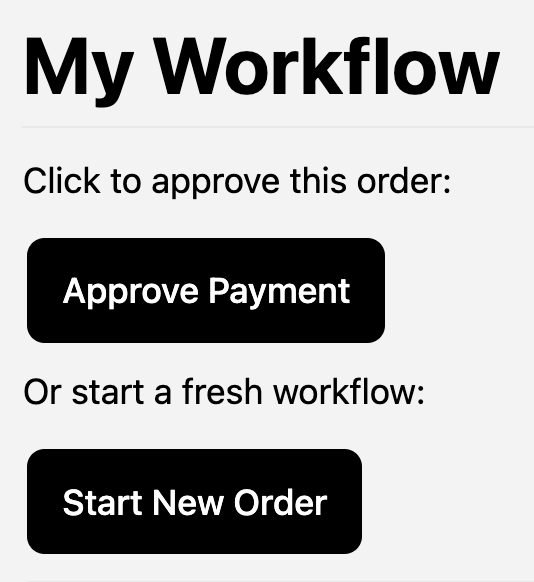
Add {% signal %} and {% start %} tags to your markdown string. Cadence Web renders them as buttons that send real signals or start new workflows, without switching to the Cadence CLI or writing a separate client.
## My Workflow

Click to approve this order:

{% signal
  signalName="approve_payment"
  label="Approve Payment"
  domain="my-domain"
  cluster="my-cluster"
  workflowId="order-123"
  runId="run-456"
  input={"operator":"ops-user"}
/%}

Or start a fresh workflow:

{% start
  workflowType="MyWorkflow"
  label="Start New Order"
  domain="my-domain"
  cluster="my-cluster"
  taskList="my-task-list"
  timeoutSeconds=3600
/%}
View the rendered result in Cadence Web
Sized Images
Standard markdown images () work, but offer no size control. The {% image %} tag lets you set width and height. It also exists because Cadence Web strips raw HTML from query responses to prevent XSS, so <img> tags in your markdown will not render.
{% image src="https://cadenceworkflow.io/img/cadence-logo.svg" alt="Cadence Logo" width="200" /%}
View the rendered result in Cadence Web

Level 3: State-Driven Dashboards
The real power: change which buttons appear based on your workflow's current state.
The OrderFulfillmentWorkflow sample demonstrates this. An order moves through states, and the dashboard shows only the actions valid for the current state:
| State | Available Actions |
|---|---|
| Pending Payment | Approve Payment, Reject (Policy / Fraud / Customer Request) |
| Payment Approved | Mark Ready to Ship, Full Refund, Partial Refund |
| Ready to Ship | Ship via UPS / FedEx / USPS, Cancel Order |
| Shipped | Mark as Delivered |
| Delivered / Cancelled / Refunded | No actions, order complete |
The query handler builds the button list dynamically based on order.Status:
- Go
- Java
func makeActionButtons(ctx workflow.Context, order Order) string {
	wfID := workflow.GetInfo(ctx).WorkflowExecution.ID
	runID := workflow.GetInfo(ctx).WorkflowExecution.RunID

	switch order.Status {
	case StatusPendingPayment:
		return fmt.Sprintf(`
{%% signal signalName="approve_payment" label="Approve Payment"
  domain="cadence-samples" cluster="cluster0"
  workflowId="%s" runId="%s" input={"operator":"ops-user"} /%%}
{%% signal signalName="reject_payment" label="Reject: Fraud Suspected"
  domain="cadence-samples" cluster="cluster0"
  workflowId="%s" runId="%s" input={"reason":"Fraud Suspected","operator":"ops-user"} /%%}
`, wfID, runID, wfID, runID)

	case StatusReadyToShip:
		return fmt.Sprintf(`
{%% signal signalName="ship_order" label="Ship via UPS"
  domain="cadence-samples" cluster="cluster0"
  workflowId="%s" runId="%s"
  input={"trackingNumber":"1Z999AA10123456784","carrier":"UPS","operator":"ops-user"} /%%}
`, wfID, runID)
	// ... other states
	}
	return "*No actions available*"
}
private String makeActionButtons() {
    switch (order.status) {
        case STATUS_PENDING_PAYMENT:
            return sig("approve_payment", "Approve Payment",
                       "{\"operator\":\"ops-user\"}")
                 + sig("reject_payment", "Reject: Fraud Suspected",
                       "{\"reason\":\"Fraud Suspected\",\"operator\":\"ops-user\"}");
        case STATUS_READY_TO_SHIP:
            return sig("ship_order", "Ship via UPS",
                       "{\"trackingNumber\":\"1Z999AA10123456784\",\"carrier\":\"UPS\",\"operator\":\"ops-user\"}");
        // ... other states
    }
    return "*No actions available*";
}

private String sig(String signalName, String label, String input) {
    return "{% signal signalName=\"" + signalName + "\" label=\"" + label + "\""
        + " domain=\"" + DOMAIN + "\" cluster=\"" + CLUSTER + "\""
        + " workflowId=\"" + cachedWorkflowId + "\" runId=\"" + cachedRunId + "\""
        + " input=" + input + " /%}\n";
}
Each time the user clicks Run on the query, the dashboard reflects the latest workflow state with the appropriate actions.
Tag Reference
{% signal %}
Sends a signal to a running workflow.
| Attribute | Required | Description |
|---|---|---|
signalName | Yes | Signal type the workflow listens for |
label | Yes | Button text |
domain | Yes | Cadence domain |
cluster | Yes | Cluster name configured in Cadence Web |
workflowId | Yes | Target workflow execution ID |
runId | Yes | Target workflow run ID |
input | No | Signal payload: true, false, "string", or {"json":"object"} |
{% start %}
Starts a new workflow execution.
| Attribute | Required | Description |
|---|---|---|
workflowType | Yes | Registered workflow type name |
label | Yes | Button text |
domain | Yes | Cadence domain |
cluster | Yes | Cluster name configured in Cadence Web |
taskList | Yes | Worker task list |
wfId | No | Custom workflow ID |
input | No | Workflow input |
timeoutSeconds | No | Execution timeout in seconds |
sdkLanguage | No | "GO" or "JAVA" |
{% image %}
Renders an image with optional size control. Standard markdown images () also work.
| Attribute | Required | Description |
|---|---|---|
src | Yes | Image URL |
alt | Yes | Alt text |
width | No | Width in pixels |
height | No | Height in pixels |