Eliminating Noisy Neighbors in Cadence Clusters

Cadence is a multi-tenant workflow orchestration platform, where a single cluster can serve many domains running different types of workflows. When a domain has a sudden traffic spike, it can consume a disproportionate share of resources used for history task processing and degrade performance for other domains in the same cluster, which is a noisy neighbor problem.
As the scale and diversity of workloads in a Cadence cluster grow, isolation between domains becomes increasingly important for maintaining predictable performance and reliability. To address this challenge, we redesigned two key components of the Cadence History service (the history task scheduler and history queue) to provide stronger domain-level isolation.
The Old Architecture
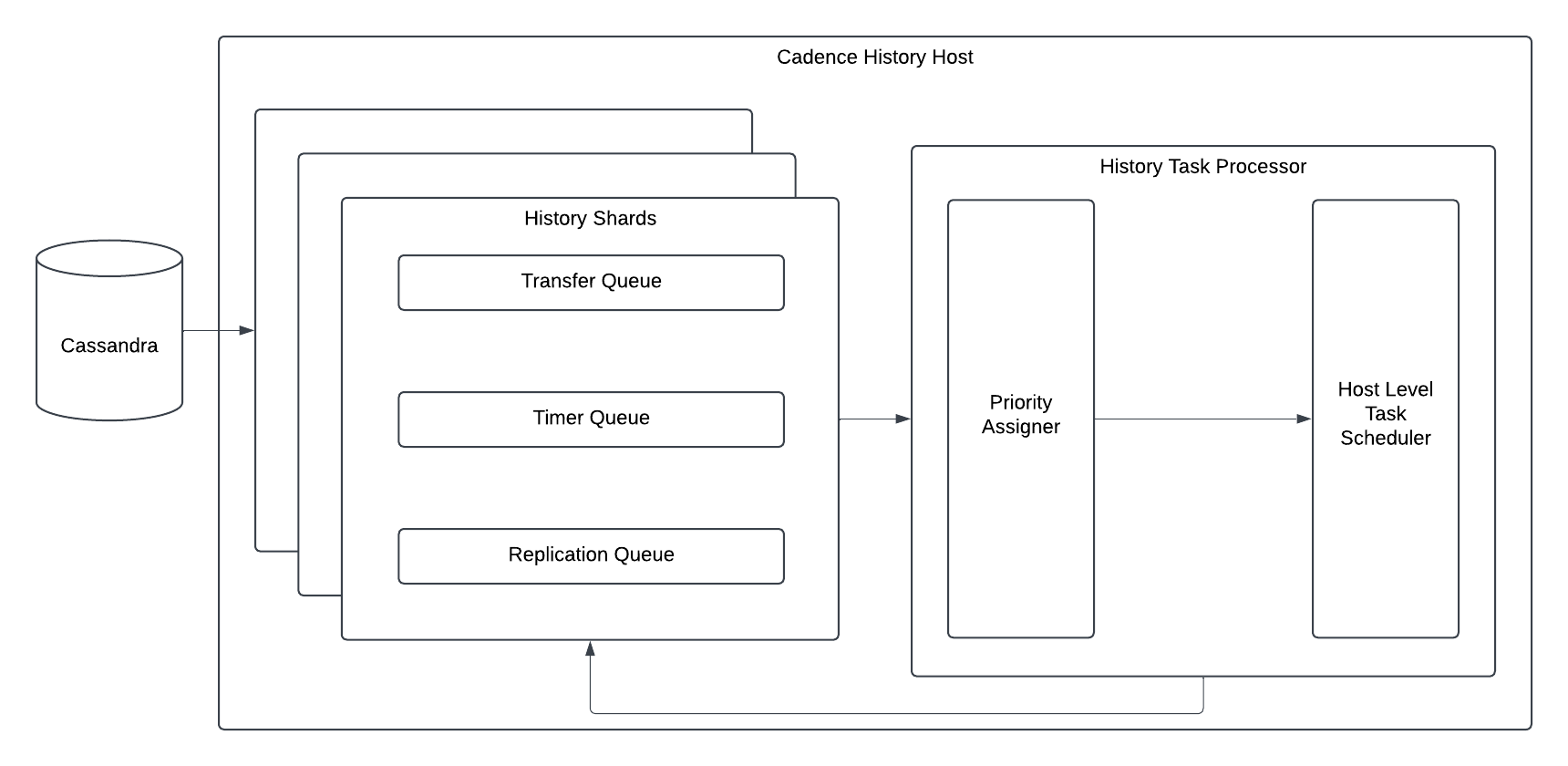
The diagram above shows the overall architecture of history task processing. A shard-level history queue reads tasks from the database and sends them to a host-level history task scheduler, which schedules the tasks for processing.
History Queue
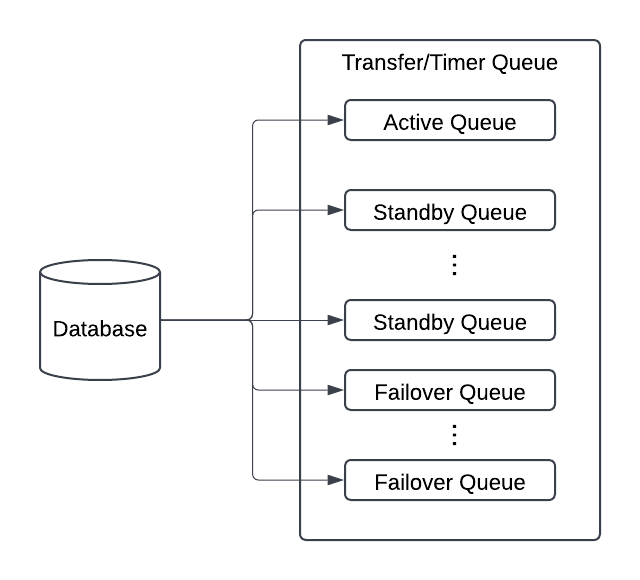
The diagram above shows the detailed architecture of the history queue within a single shard. Each shard has one active queue and (N - 1) standby queues, where (N) is the number of clusters in the replication group. Failover queues are ephemeral and are created only when a domain failover occurs.
For example, consider a Cadence deployment with two clusters, primary and secondary. In the primary cluster, the active queue reads tasks from the database and filters out tasks belonging to domains that are not active in primary. The standby queue also reads tasks from the database, but filters out tasks belonging to domains that are not active in secondary. During a domain failover, a temporary failover queue is created to process tasks for the domain undergoing failover.
Tracking Progress
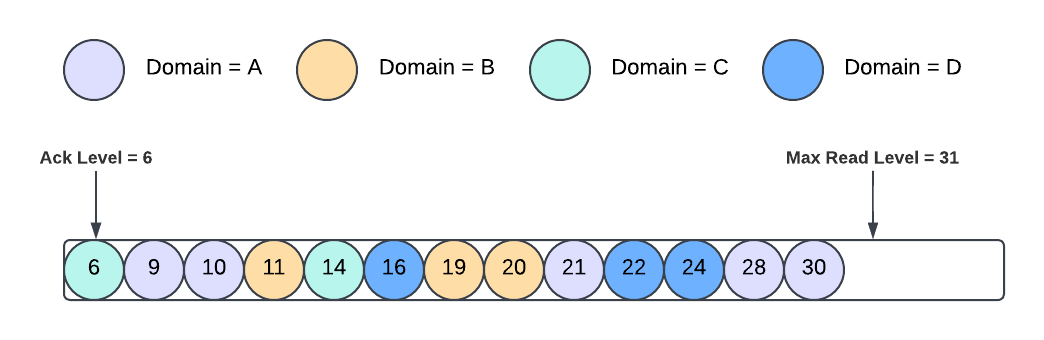
The history queue persists cursors in the database to track task processing progress:
- Ack Level: The highest point below which all tasks have been processed and deleted from the database. Each active queue and standby queue has a separate ack level.
- Max Read Level: The upper bound of tasks which have been created. The active and standby queues within the same shard share the same max read level.
On shard reload, each queue resumes processing tasks within range [Ack Level, Max Read Level), and new task IDs are allocated starting from the max read level.
NOTE: Active and standby queues maintain separate ack levels to avoid head-of-line blocking. Standby tasks may need to wait for replication before they can be processed. If active and standby tasks shared the same ack level, a delayed standby task could prevent the ack level from advancing even when subsequent active tasks have already been processed.
Task processing must still be idempotent. Persisting processing progress in the database does not eliminate the possibility of duplicate task execution.
History Task Scheduler
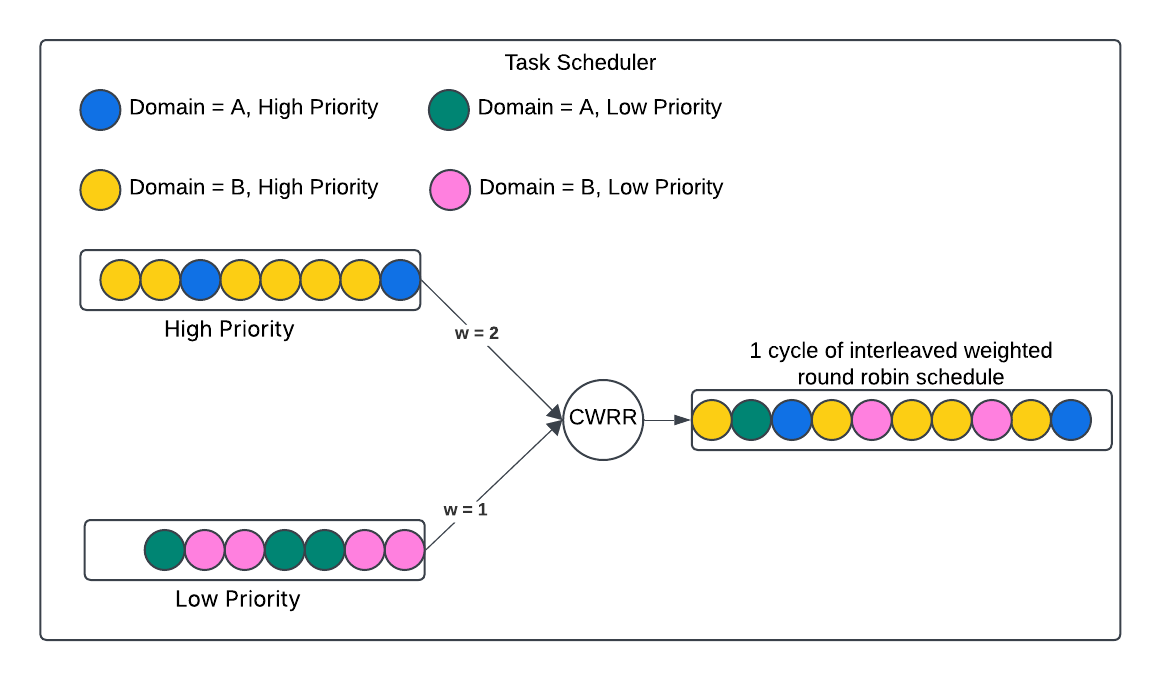
Priorities are assigned to tasks before they are submitted to the scheduler. The scheduler uses a weighted round-robin algorithm to schedule tasks across different priority levels, with higher-priority tasks receiving a larger scheduling weight. Tasks with the same priority are scheduled in FCFS order, regardless of their domains.
By default, tasks from active domains are assigned high priority, while tasks from standby domains are assigned low priority. A rate limiter is applied to high-priority tasks from active domains to prevent them from consuming excessive scheduling capacity. When the rate limit is exceeded, additional active domain tasks are assigned low priority and scheduled alongside other low-priority tasks.
The Problem: Noisy Neighbor Effect
As you can see from the old architecture, all domains in the same cluster share the history queue and task scheduler components. These components provide no domain-level isolation, so a traffic spike in one domain can consume shared resources and negatively impact other domains, resulting in a noisy neighbor problem. The rate limiter on high-priority tasks does not address this issue because it limits aggregate traffic rather than ensuring fair scheduling across individual domains.
Real-World Scenarios
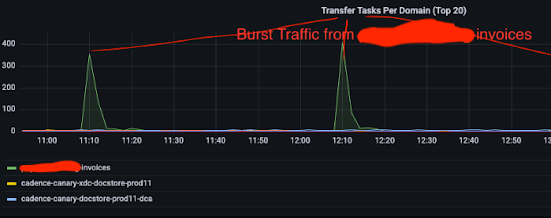
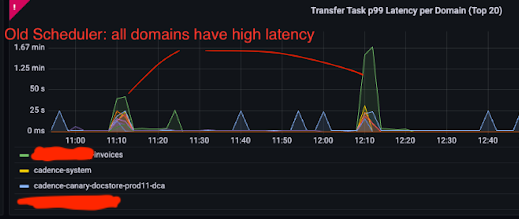
The diagrams above show a real-world example of the noisy neighbor effect. The invoices domain experiences periodic traffic spikes, and during each spike, the task processing latency of other domains increases as well, demonstrating how traffic from one domain can impact the performance of others sharing the same cluster.
The New Architecture
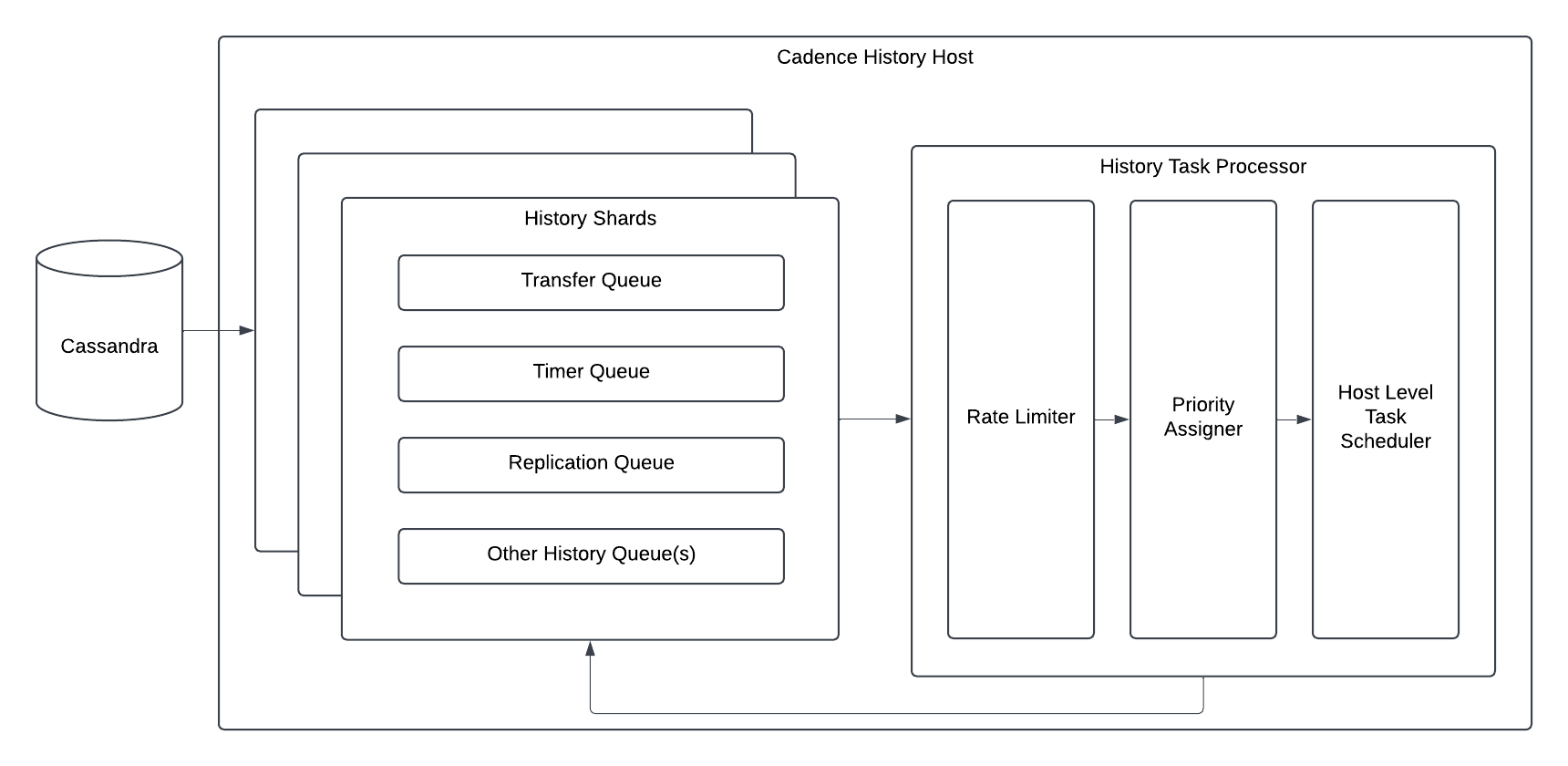
The high-level architecture remains largely unchanged. We added a domain-level task rate limiter before the priority assigner to rate-limit history tasks based on their domains.
History Queue v2
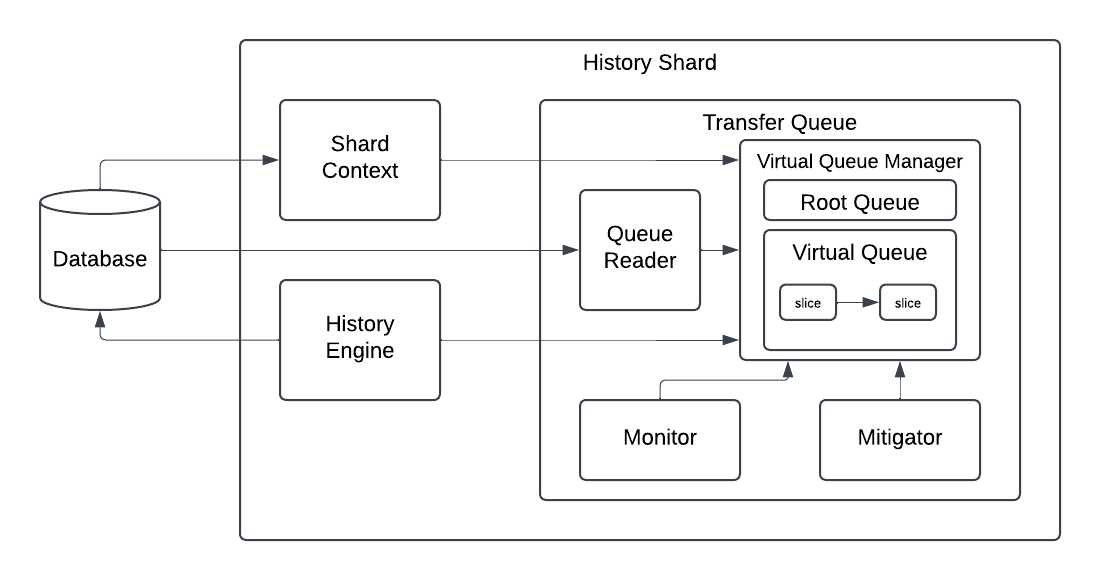
The new history queue uses a layered structure to process tasks while preventing one slow domain from blocking others. Layers, from the outermost to the innermost layer:
- Shard context: Fetches and tracks the queue processing progress from the database.
- History engine: Appends tasks to the database and notifies the transfer/timer queue to fetch new tasks from the database.
- Transfer/Timer queue: The event loop. Manages timing (when to wake up, when to persist state) and owns the root virtual queue.
- Virtual queue manager: Manages a set of virtual queues. Under normal conditions, there is only one (the root queue). When a domain generates too many tasks, the mitigator creates additional virtual queues to isolate and throttle that domain.
- Virtual queue: Each virtual queue runs its own goroutine and processes an ordered list of virtual slices sequentially. It is an isolation unit of the history queue. New tasks are always added to the root queue.
- Virtual slice: Represents a range of tasks with an associated filter. It is the smallest processing unit.
- Monitor: Detects when a domain generates too many tasks and sends a notification to the mitigator.
- Mitigator: Creates additional virtual queues to isolate and throttle tasks from overloaded domains.
- Queue reader: Fetches tasks from the database.
Virtual Slice Operations
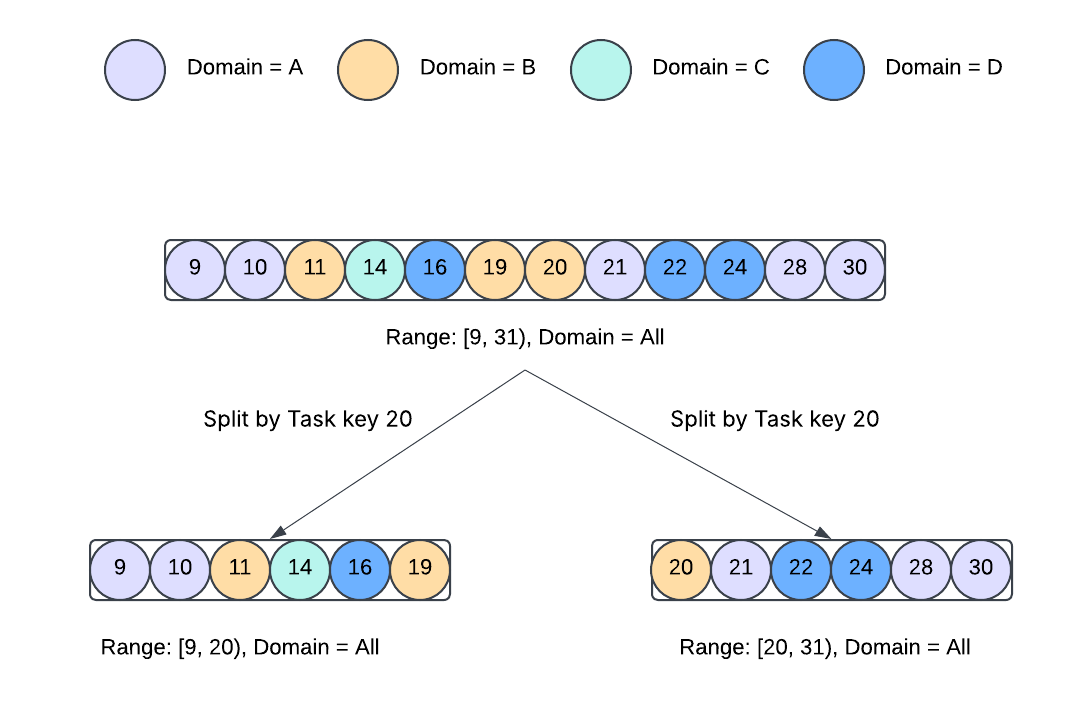
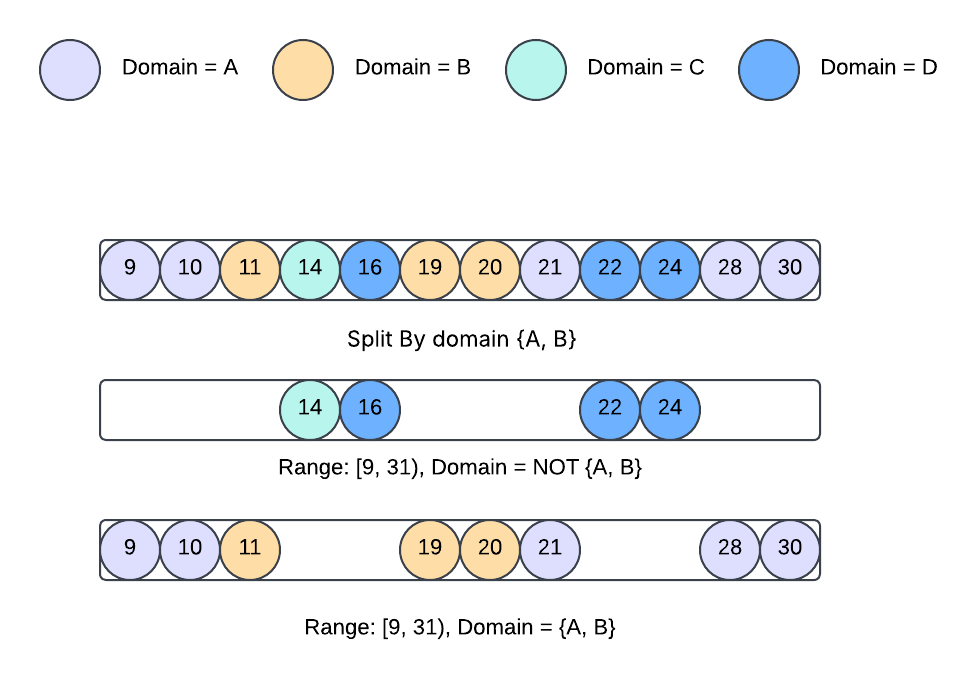 Split: A virtual slice can be split by a task key or domainIDs. The diagrams above show how a virtual slice is split by a task key and domainIDs.
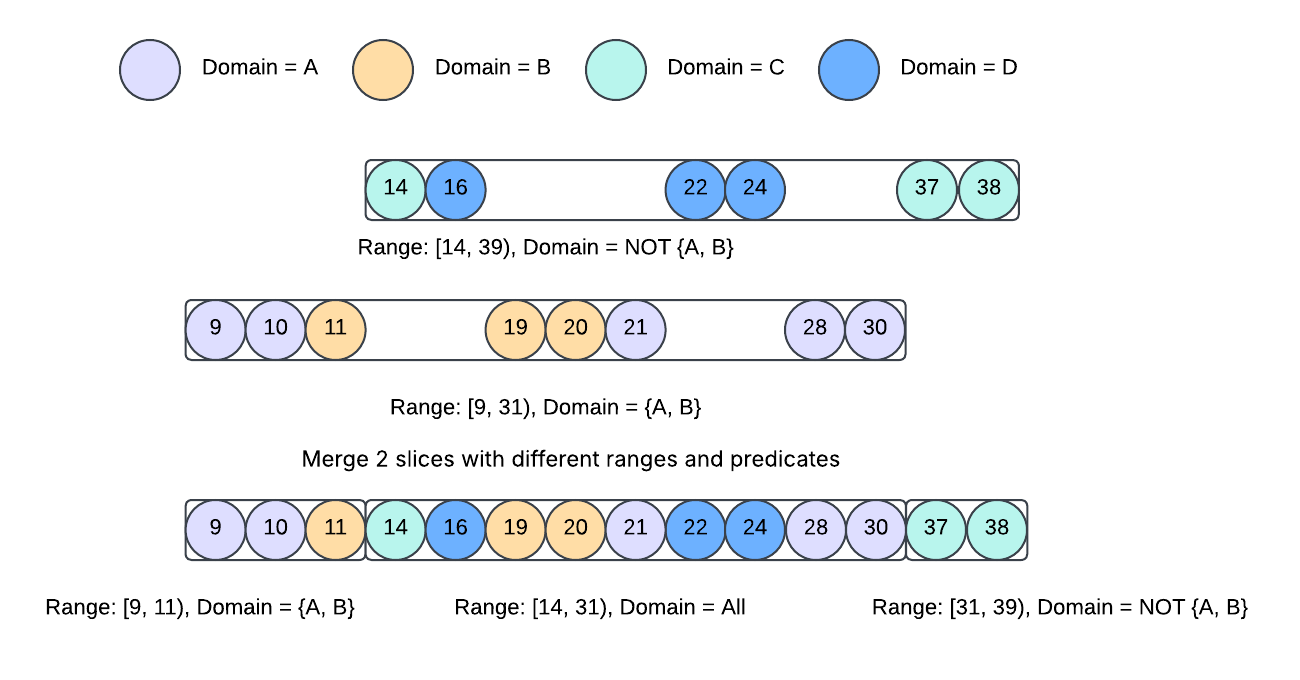 Merge: 2 slices can be merged. The diagram above shows the most complex merge scenario. A merge operation of 2 virtual slices can produce 1 to 3 virtual slices.
Virtual Queue State
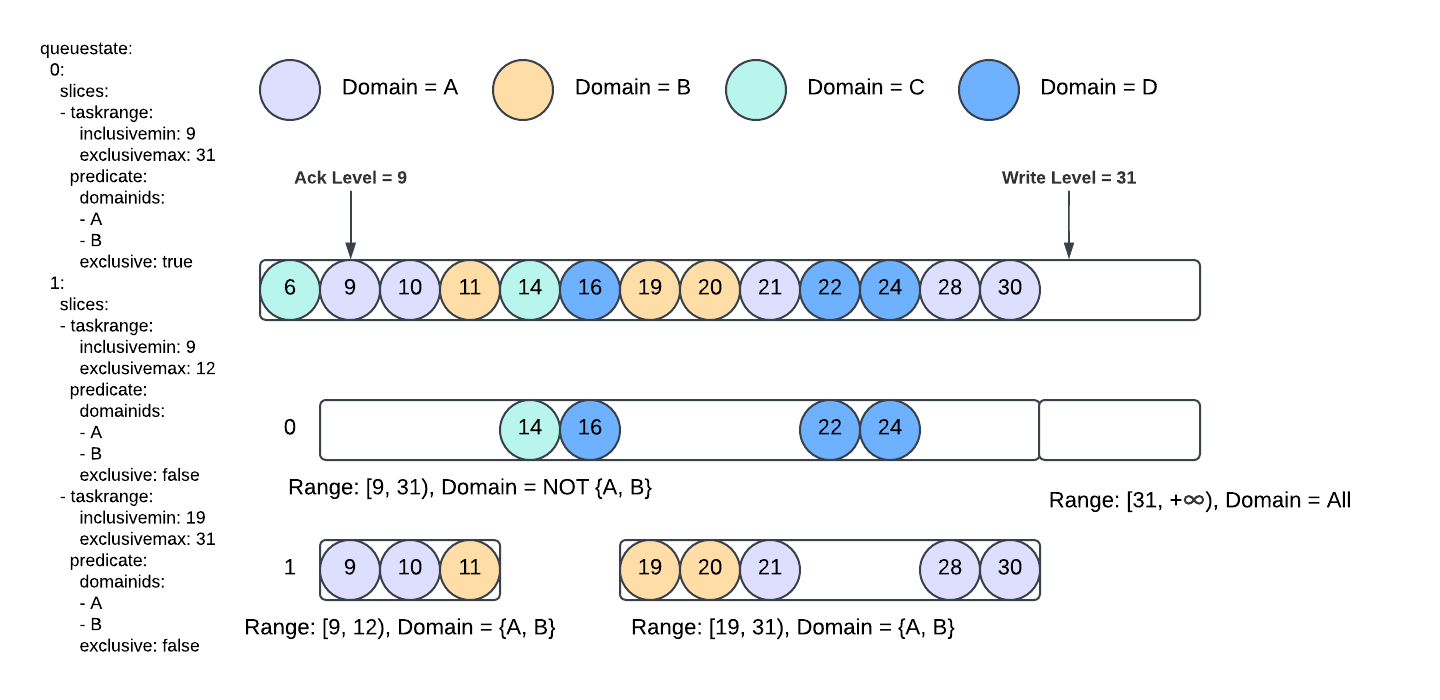 The virtual queue structure generalizes the existing active/standby queue model, providing greater flexibility for isolating and managing different groups of tasks. Similar to how the ack levels of active and standby queues are persisted separately, the state of each virtual queue is also persisted in the database. The diagram above shows an example of the persisted virtual queue state.
History Task Scheduler
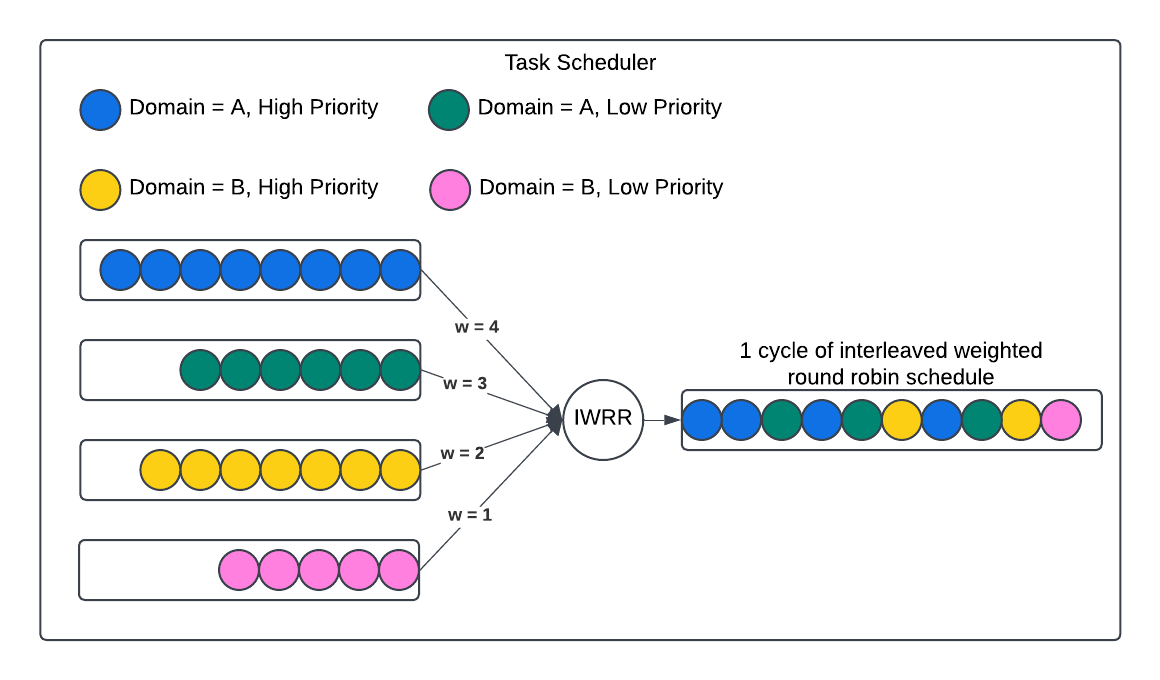 The diagram above shows how the task scheduler schedules tasks from different domains with different priorities. When a task is submitted to the task scheduler, it is appended to a queue based on its domain and priority (priority is assigned by the priority assigner based on its type), and the scheduler processes the queues with a weighted round-robin algorithm. The weights are configurable, but by default, each domain is assigned the same weight, ensuring that all domains receive a fair share of the scheduling capacity.
Improvements Observed at Uber
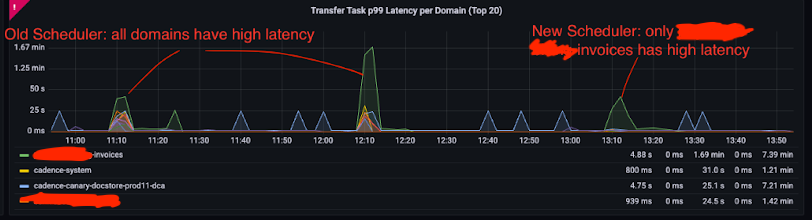
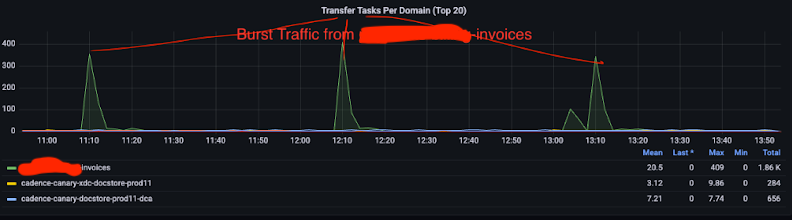 After switching to the new implementation, it is very obvious that the traffic spike from the invoices domain no longer increases the task processing latency for other domains.
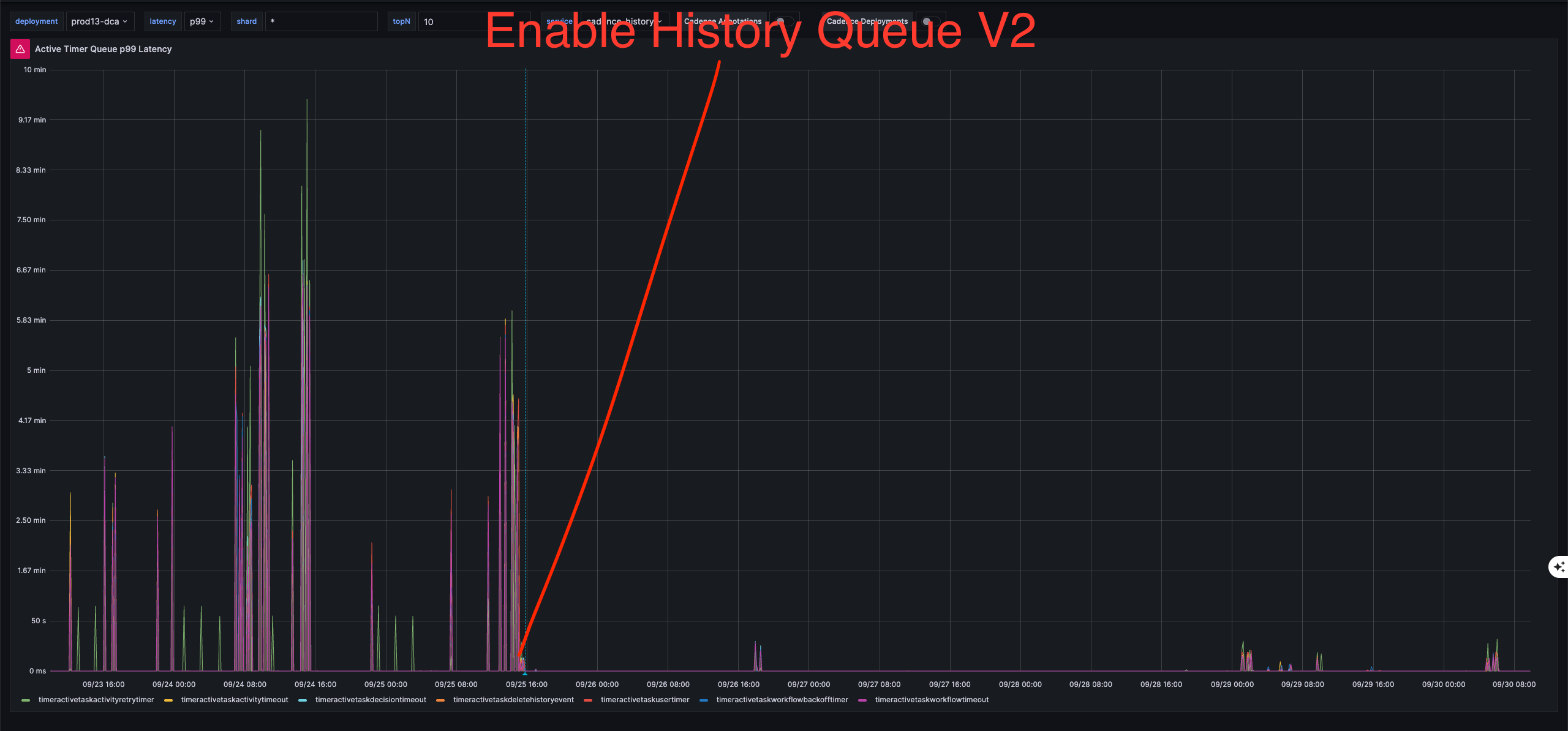 Additionally, the overall p99 latency also became less spiky after enabling History Queue V2 at Uber.
How to Enable the New Features
These features require Cadence Server v1.4.1 or later. For detailed configuration and deployment instructions, including feature flags, step-by-step enablement, monitoring, and troubleshooting, see the Domain Isolation Configuration Guide.
Try it now!
The new architecture has been running in production at Uber for over a year, and we have not observed noisy neighbors since its rollout. We are also building new features on top of this architecture, which are available only when History Queue V2 is enabled.
In the next release, we plan to enable History Queue V2 by default and begin deprecating History Queue V1. We encourage you to try History Queue V2 now and share your feedback with us! See the Domain Isolation Configuration Guide for detailed setup instructions.
- Ask a question - #cadence-users on CNCF Slack
- Open an issue - cadence on GitHub
- Join the discussion - GitHub Discussions